Today an article from the everyday life of a SQL Server DBA 😉
It was reported by the customer that the affected application showed an error message that read „File group ‚PRIMARY‘ is full“. Thereupon the first remote diagnosis from the DBA was first simple and I wanted to check the Max Size of the database files.
This was not so easy, because the database was switched offline by the customer. So there was the process of offline switching, which was apparently stopped by further transactions on the database. This made the SQL Server Management Studio impossible to use and it was not possible to perform any further meaningful diagnostics on the database.
Background on the SQL Server environment:
- 2x Windows Server 2016 virtual machine
- Windows Server Failover Cluster
- SQL Server 2016 Failover Cluster environment
To shorten the waiting time a bit, since it was a production system, I decided to failover the SQL Server instance. This causes a restart of the SQL Services and so the hope, a normal interaction with the database service again.
The service restart naturally led to the recovery process of the SQL Server service on all databases that had an unclean termination status. Since the databases were of a certain size, the process initially took about 25 minutes.
During the recovery process, I kept noticing Windows Event Viewer (System) messages:
The device, DeviceHarddisk10DR10, ist not ready for access yet.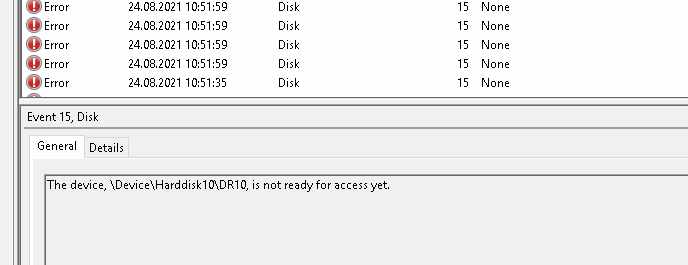
This led to the assumption that there might be something wrong with the hard disk subsystem and that the SQL Server itself is not to blame for the problem.
After the instance simply swung back to the first node after 25 minutes, and the database recovery started all over again, this suspicion was confirmed.
The service now started correctly, but a subset of the databases were still in recovery mode. This took another 40 minutes. During this time, the SQL Server Error Log kept displaying the following error messages:
SQL Server has encountered 4 occurence(s) of I/O requests taking longer than 15 seconds to complete on file [...] in database id ...
This suggests that the hard disk subsystem or the network components concerned have a problem, since a shared storage system (SAN) is used here.
Due to the sometimes very slow responding storage layer, some databases were unfortunately in „recovery pending“ status.
To clean this up again, the following T-SQL commands were executed:
USE master
GO

ALTER DATABASE <<dbname>> SET EMERGENCY
GO

ALTER DATABASE <<dbname>> SET SINGLE_USER
GO

DBCC CHECKDB(N'<<dbname>>',REPAIR_ALLOW_DATA_LOSS) WITH NO_INFOMSGS,ALL_ERRORMSGS
GO
If the repair is successful, the database can be switched back to multi-user mode.
ALTER DATABASE <<dbname>> SET MULTI_USER
GO
Unfortunately the error could not be clarified conclusively yet, if I know something new I would update this further.
 SaxonyDevOps